Stardew Valley split screen: how it works, what each player needs
Stardew Valley lets up to four people farm together on one screen. The catch most guides skip: on PC, only player one can use the keyboard, so everyone else needs a controller. Here is the whole setup, what each player needs, and a few farming games where every player can pick up a pad.
How to start split screen in Stardew Valley
Split screen arrived in the 1.5 update. It works from a farm you already have or from a new one. Either way, the farm needs a cabin for each extra player before anyone can join.
On a farm you already have
Load your save as normal.
Visit Robin at the Carpenter's Shop and build a cabin for each extra player. Each one costs 100g and goes up straight away, so you can do it on day one.
Plug in or pair a controller for each extra player.
Open the game menu and choose the Options tab.
Scroll down to the Multiplayer section and choose Start Local Co-op.
Each extra player presses Start on their controller to join.
On a new farm
On the title screen, choose Co-op, then the Host tab, then Host New Farm.
Add a cabin for each player who will join. This is also where you pick the profit margin and whether money is shared.
Once you are on the farm, start local co-op from the Options tab, as above.
The host is the player whose save it is. Everyone else plays as a farmhand in a cabin, and they can only play that farm when the host has it open.
What each player needs
A controller for everyone but player one
This is the question we hear most: why does player one get the keyboard? The Stardew Valley wiki puts it plainly: the keyboard on PC is always reserved for the first player, though the first player can use a controller too. So two people can't share one keyboard, and a keyboard and mouse can't be given to player two.
For a family of four on a PC, that means at least three controllers. Player one can pick either. On the Switch and Switch 2, each player needs a full controller or a pair of Joy-Con.
Which platforms have it
Stardew Valley split screen by platform, from the Stardew Valley wiki
Platform
Players on one screen
Good to know
PC (Windows, Mac, Linux)
Up to 4
Only player one can use the keyboard.
PlayStation 4 and later
Up to 4
No PlayStation Plus needed for split screen.
Xbox One and later
Up to 4
No Game Pass needed for split screen.
Nintendo Switch 2
Up to 4
Full controller or two Joy-Con each.
Nintendo Switch
Up to 2
Full controller or two Joy-Con each.
One copy of the game
Split screen runs on one computer or console, so one copy is enough. On Steam, Stardew Valley was $14.99 when we checked on November 19, 2026, and runs on Windows, macOS and SteamOS and Linux.
Limits and gotchas
One farm for everyone. All players share the same farmland. You decide together when to sleep (everyone gets in bed), when a festival starts, and whether to finish the Community Center or join Joja.
Money can be shared or split. Pick it when you make the farm, or change it later at the Town Ledger in the Mayor's Manor.
The profit margin is for keeps. On a new co-op farm you can lower crop and forage prices to 75%, 50% or 25% to balance out more players. You can't change it after the farm is made.
No mixing on consoles. On consoles you pick split screen or online for a session. On PC, a host who loaded the farm through Co-op can have both.
Pulling down a cabin removes that player. The host can demolish a cabin at any time. Its farmhand leaves the game, and their things go into a chest where the cabin stood.
Not on every device. Split screen is on PC and consoles. Multiplayer on phones and tablets is an experimental feature, and works differently.
Farming games where every player gets a controller
If the keyboard rule is a problem in your house (one keyboard, kids who want pads, or a laptop on the TV), these let everyone play on one screen. We checked each one's store page on November 19, 2026.
Our game · Coming soon
CatKraft
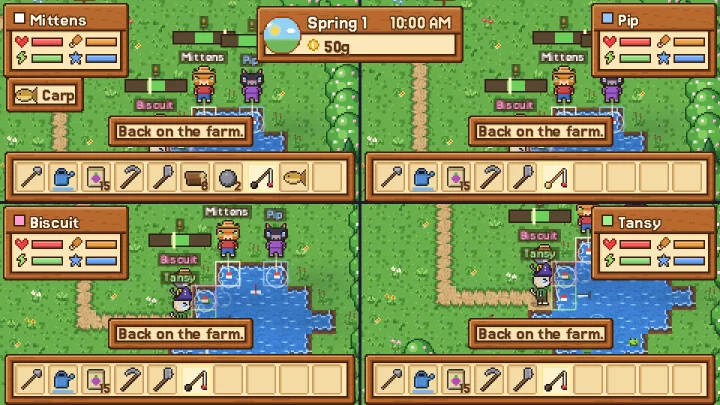
A cozy pixel-art farming game where you play a cat, made by Matt and his kids. Up to four cats share one screen. Pair some gamepads and press A to join; the keyboard joins as one more player. So four pads works, and so does three pads and the keyboard.
The screen splits in halves for two cats and in quarters for three or four.
Every cat has its own farm, coins and bag. Everyone shares the clock and the day.
Visit a friend's farm from the world map to help water, pick and build.
Each cat's menus open on its own screen, so everyone can craft at once.
Join or leave any time; your cat keeps its things.
A relaxed co-op farming game. Its Steam page lists Shared/Split Screen Co-op, Online Co-op and full controller support. The store page doesn't say how many players fit on one screen, so check before you buy for a family of four.
Windows and Mac · 2 players
Cult of the Lamb
Less of a farming game: you build a cult of woodland followers, tend its crops and head out on dungeon crusades, and it's a lot spookier than Stardew. Its Steam page says the whole campaign plays in local co-op, one player as the Lamb and one as the Goat, and lists full controller support.
Questions, answered
Can you play Stardew Valley split screen on PC?
Yes. Since the 1.5 update, up to four players can share one PC in split screen: the host plus three more, each with a cabin on the farm and a controller.
Does player one have to use the keyboard?
No, but only player one can. The Stardew Valley wiki says the keyboard on PC is always reserved for the first player, though the first player can use a controller too. Every other player needs a controller of their own.
How many players can play split screen?
Up to four on PC, PlayStation, Xbox and Nintendo Switch 2. On the original Nintendo Switch, split screen is limited to two players.
Does each player need their own copy?
No. Split screen runs on one computer or console, so one copy is enough. On consoles, split screen doesn't need an online subscription either.
Can two people play Stardew Valley on one keyboard?
No. On PC only the first player can use the keyboard, so the second player needs a controller.
Is CatKraft out yet?
No. CatKraft is coming to Mac, Windows and Linux. There's no release date or price yet. Leave your email below and we'll write once, when it's ready to download.