Free pixel art maker for game items
Draw a 16 by 16 item, see it in a CatKraft bag, and download a see-through PNG. No account, no ads.
Colour: Black
Tap or drag to paint. Keyboard: arrows move, Space paints, Ctrl+Z undoes.
How to draw an item
- Step 1
Pick a colour and draw
Tap or drag on the grid. Fill paints a whole area, Mirror draws both sides at once, and the rubber makes a pixel see-through.
- Step 2
Name it and set a recipe
Give it a name of up to 14 letters, pick up to three things it needs, and set a price. Like the game, the price stops at twice what the ingredients sell for.
- Step 3
Check it in the bag
Your item sits in a bag and on a crafting menu while you draw, so you see how it looks next to the real ones.
- Step 4
Download or share it
Save a PNG at 16, 128, 256 or 512 pixels, or copy a link that opens your item on anyone's screen.
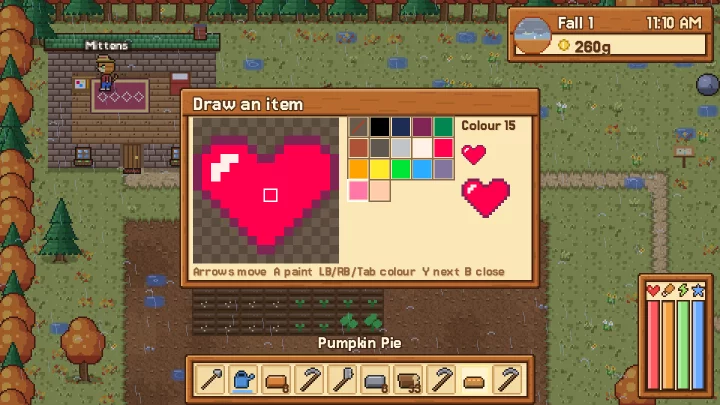
How items work in CatKraft
This is a small copy of the item designer in CatKraft, a cozy cat farming game made by Matt and his kids. The game isn't out yet.
- In the workshop you pick Draw a new item and paint on this same grid
- The finished item lands in your bag
- It also lands on the crafting menu, made from the ingredients you chose
- Items save to a file you can load into another game, and Download CatKraft file makes that file
Questions, answered
Is the pixel item designer free?
Yes. It is free, with no account, no sign-up and no ads. You never need to give an email to use it.
What size is the art?
Every item is 16 by 16 pixels, like the items in CatKraft. You can download the PNG at 16, 128, 256 or 512 pixels wide, and every pixel stays sharp.
Can I use my art in my own game?
Yes. What you draw is yours, so use it in your own game, a mod or a school project.
Does it save my drawing?
Yes, in this browser and in the share link. Nothing you draw is sent to us. Clearing your browser's data removes the saved copy, so download the PNG or keep the link.
Does it work on a phone or tablet?
Yes. Draw with a finger or a mouse. On a keyboard, the arrow keys move and Space paints.
Is it the same as the designer in CatKraft?
It is a small copy of it. The grid, the 16 colours, the name, the price rule and the recipe are the same, and the CatKraft file it saves is the kind the game loads.
More from CatKraft
- CatKraft: the cozy cat farming game made by Matt and his kids, with its trailer and screenshots.
- CatKraft guides: every guide in one place, with a line on what each one covers.
- How to play CatKraft together: four cats on one screen: Up to four cats can farm, fish and explore on one computer. Here is how to join, what each cat gets, and how to help on a friend's farm.
- Stardew Valley split screen: what each player needs, how to set it up, why player one keeps the keyboard, and farming games where every player gets a controller.
CatKraft is coming to Mac, Windows and Linux
The game this item goes in isn't out yet. Leave your email and we'll write once, when it's ready to download.
We'll email once to confirm, then only about CatKraft. Every email has a link to leave. Privacy